All kids love to draw. Drawing helps to develop their imagination, fuel their creativity, express themselves, and enhance their artistic abilities.
If your kid is passionate about drawing, doodling and writing, it is a must to provide them with essential items to enhance their skills.
Your child can be extraordinary or can something better if he/she has the right gadget and resources in their hand.
Digital drawing tablets are a fantastic gift for creative young learners, Which typically involve a stylus and a responsive surface, are a great addition to any toy box.
Endlessly reusable, they are eco-friendly, mess free, and safe—your toddlers won’t be eating crayons or sticking paint in their mouths.
This allows Kids to explore different brushes and colors on the digital canvas. and can email art work to her family or print out multiple copies to give to friends at school.
It’s also a wonderful opportunity for parents to bond with their children and participate in their creative journey.
But the problem is that there are so many drawing tablet brands, types and models available on the market. It can all be very overwhelming for a parent who just wants to get a good tablet for their curious child.
Fear not, we have narrow the pool of options down to the best models on the market. We’ll also talk in depth about some topics related to tablets for kids.
That way, you’ll be able to make a better choice when you’re shopping for a drawing tablet for your child.
What is a Drawing Tablet?
A drawing tablet, also known as a graphics tablet, is a device that allows artists to draw and create digital art using a stylus pen and a touch-sensitive surface.
It allows you to interact with a drawing software such as Krita, illustrator or Photoshop.
The tablet is connected to a computer or standalone, which allows the artist to see their creations in real-time on their screen as they draw on the tablet.
Is a drawing tablet worth it?
Drawing tablets offer several advantages over traditional drawing methods.
They allow for more precise control and accuracy than mouse when drawing.
With a stylus pen, artists can create lines and shapes with ease, and pressure sensitivity allows for control over the thickness and opacity of the lines.
Drawing tablets also offer the ability to undo mistakes and make changes easily, as well as the ability to work with layers and other digital tools that can enhance the creative process.
How many types of drawing tablets for kids?
If you’re not a major drawing tablet user yourself, you might find yourself suddenly intimidated by the nuances of the drawing tablet market.
When it comes to the best drawing tablets for kids, there are 4 main categories to think about.
The naming of the 4 types of tablets can be confusing, so let’s understand what they’re called and the main differences.
LCD Writing Tablet
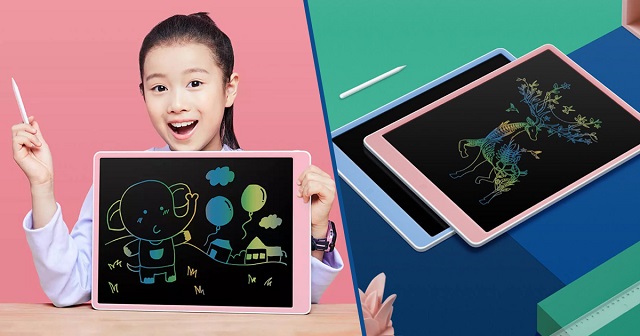
LCD writing tablets use liquid crystal display technology to create a digital writing surface that can be easily used with a stylus or other writing tool.
Moreover, these digital surfaces can be reused multiple times because of the integrated erase function.
The most popular use of LCD Writing Tablets is perhaps as a children’s toy, a doodling device, something that replaces paper, doodling books and chalkboards, saving a lot of money for parents due to low price.
Some common criticisms of the generic LCD Writing Tablets have included their inability to save the work or erase partially without deleting the entire screen.
Non-screen Drawing Tablet
A non-screen graphics tablet is the most basic type of drawing tablet. It consists of a stylus pen and a touch-sensitive surface that connects to a computer (Windwos, Mac, Linux and Chrome OS) or Android mobile device.
They can connect to computer using a single USB cable or wireless using bluetooth or 2.4GHz wifi.
The tablet itself does not have a display, so artists must look at their screen while drawing on the tablet. This requires hand-eye coordination, so it may be difficult to use at first. There will be a several-day learning curve.
However, Screenless tablets are usually cheaper than other types of drawing tablets, Most are under $100, making them a great option for beginners and amateurs.
Drawing tablet with screen
This type of drawing tablet comes with a built-in screen. This allows the artist to draw directly on the tablet’s display, which can provide a more natural and intuitive drawing experience.
Display drawing tablets come in a variety of sizes and resolutions, from 10-inch with 1080p resolution to 32-inch with 4K resolution. However, they are typically more expensive than non-screen graphics tablets, which can cost anywhere from $200 to $4000.
There are also a lot of cables (USB-C, HDMI, power cable) you need to plug in to connect to a computer and it won’t function wirelessly like the non-screen tablet does.
Standalone Drawing Tablet
This type of drawing tablet does not need to be connected to a computer or mobile device to work. These tablets often have built-in operating systems (Windows, iOS and Android), computer, screen and stylus.
They can be used for tasks like watching videos, browsing the internet and playing games, in addition to creating digital art.
Standalone tablets are the most expensive type of drawing tablet, but they offer the most versatility, portability and convenience.
How to Choose the Right Drawing Tablet for Kids?
If you’re not a major drawing tablet user yourself, you might find yourself suddenly intimidated by the nuances of the drawing tablet market.
We’ve added this buyer’s guide section to help you find the best tablet. There are a few things that you should keep in mind when choosing a drawing tablet for your child:
Size of drawing area
Different drawing tablets have different sizes, and it is the working area / screen size that defines the size of the tablets.
The bigger the size of the working area / screen, the higher the price will be in most cases.
A bigger working area/ screen provides a better and comfortable drawing experience while smaller tablets provide better portability.
Pressure Sensitivity
Pressure sensitivity refers to the amount of pressure needed to create a line or shape with the stylus pen. A higher level of pressure sensitivity allows for more precision and control when drawing.
Most modern drawing tablets come with varying levels of pressure sensitivity, usually ranging from 2048 to 8192 levels.
The higher the level of pressure sensitivity, the more control a kid has over the thickness, opacity, and texture of their lines and strokes.
Operating System and Compatibility
When choosing a drawing tablet with or without screen, it is important to consider its compatibility with your computer or mobile device.
Most drawing tablets are compatible with both Windows and Mac operating systems, but some may not be compatible with certain art software or devices (chromebook and android).
For standalone drawing tablets, Even while the iPad, windows and Android tablets are capable devices, a Windows tablet or iPad may be a better option if you’re looking for something that you will use primarily for drawing.
On the other hand, the Android google play store lacks the large number of apps offered on iOS and Windows.
Brand
Wacom has long been the go-to brand for digital artists and creatives when it comes to pen tablets, but they’re overpriced due to brand name. Huion and XP-Pen are both great, affordable options.
For standalone drawng tablets, Amazon Fire, Microsoft surface, Apple iPad and Samsung Galaxy tab are good picks.
Parental Controls
Parental controls on laptops and tablets allow you to automatically limit the amount of time your child spends on their device, as well as to otherwise control and monitor their screen time.
Luckily, Most tablets and laptops will offer these in some form, but you need to check it before buying.
Safety and Durability
The kids may be cute, but they aren’t exactly careful, so the tablet needs to be able to roll with the punches.
If the drawing tablet is without screen, it will be more durable and have a longer lifespan.
Cracked screens reveal sharp edges, so displays with reinforced, shock-proof bezels are a fantastic choice.
Additionally, Purchase a good case can protects drawing tablet from shock, drops and scratches.
Age Group
For young kids under the age of 7, a simple LCD Writing tablet that allows them to draw and doodle is perfect. They don’t need anything fancy.
As children get older or for teenagers, more advanced drawing tablets can help them practice, fine-tune, and learn different methods of design and draw.
In fact, even adults can use pen tablet for their daily routine: writing, drawing, taking notes, editing photos, Annotating PDFs and much more.
Price Tag
Kids doesn’t need fancy tech, something basic enough to be built durable is just fine
In addition, Even if they’ve got talent, they could just as well be enamored with something else within a month.
So you can lessen the blow to your finances by choosing the most affordable option that still appeals to your child.
If you have a teenager who’s serious about diving into graphic design at a professional level, it’s a good idea to get something with lots of features and functionality.
10 Best Drawing Tablers for Kids and Teenagers in 2024
Below, we’ll go through 10 best drawing tablets for kids and teenagers. You’ll get details and feedback on each one. That way you’ll be able find a perfect fit.
1. iPad 9th Gen
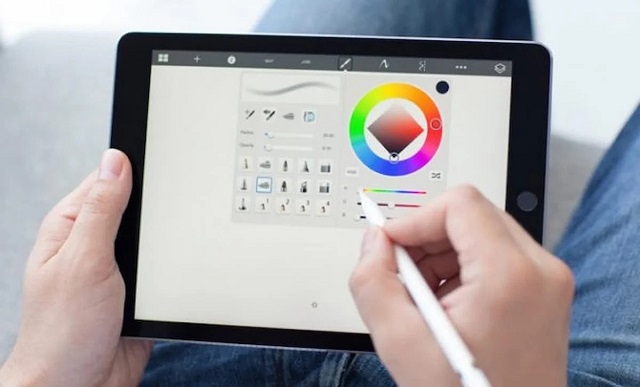
The standard iPad currently has two offerings – the 10.2-inch 9th Generation and 10.9-inch 10th Generation. The former is the cheapest iPad now, But it’s just as well-built and versatile as its pricier siblings.
The 10.2-inch IPS screen with 2160 x 1620-pixel resolution is great for kids who want to draw artworks, play some games, watch videos, and even do school work.
The iPad is powered by the A13 Bionic chip and 3 GB of RAM, ensuring swift and smooth performance for demanding apps and games. It also comes with either 64GB or 256GB of storage space, which should be plenty for your kids.
Plus, the iPad 9th Gen even has the Smart Connector, allowing support for the Apple Smart Keyboard and Apple Pencil (first generation).
So, it’s great that your kid can draw, write, or take notes to a really high quality with the Apple Pencil, and drawing experience is fantastic.
With 32,4Wh battery capacity, The iPad has about 10 hours of battery life, which should be plenty to keep kids entertained.
Apple’s App Store offers a huge range of educational apps and games for kids of all ages, as well as tons of apps for creating and editing art, which can nurture a child’s creative impulses.
An iPad isn’t cheap, but it will last for years—thanks to great hardware and to frequent system and security updates—and the app library means an iPad will stay useful as your kid grows and their interests change.
2. Samsung Galaxy Tab S6 Lite
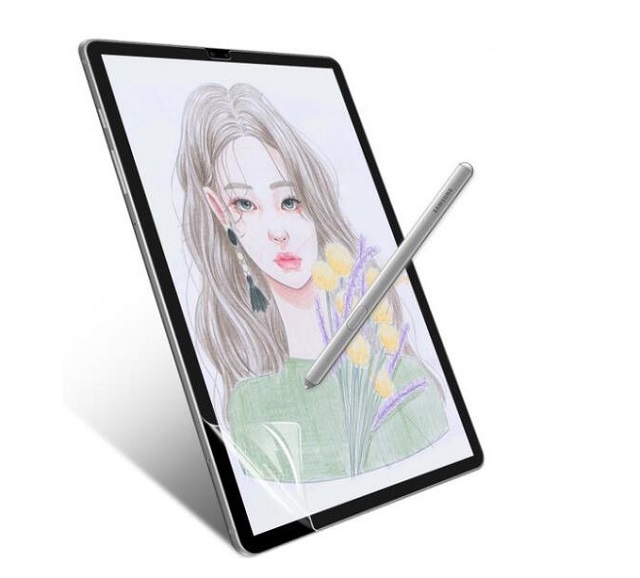
If you have an older kid with an artistic bent, The Samsung Galaxy Tab S6 Lite is a portable, affordable creative tablet for note-taking and drawing.
It has a decen 10.4-inch LCD screen with a 2000 x 1200 resolution and covers 98.4% of the sRGB color gamut, which offers a sharp and bright enough experience to enjoy everything on screen.
The Tab S6 Lite uses a 2.31 GHz octa-core Samsung Exynos 9611 processor with 4GB of RAM, Performance is middling but enough for a slight amount of productivity.
It includes either 64GB or 128GB of internal storage. Both have microSD card slots to expand storage up to 1TB.
The included S-Pen stylus features 4,096 levels of pressure sensitivity, tilt recognition and palm rejection, It is very responsive and offers low-latency drawing.
The construction utilizes an upgraded metal frame for the average any-day hiccups that might occur. The S Pen attaches itself magnetically to the tablet.
The Tab S6 Lite tablet is running with Android 12, and should get updates for a long time. You kid will be able to connect to the Google Play store for the latest educational and painting applications.
It also has a ton of battery life — lasting over 12 hours on a single charge, ombined with portable size and weight, making this one of the top picks as a tablet for your kid to take to school.
3. Microsoft surface Go 3
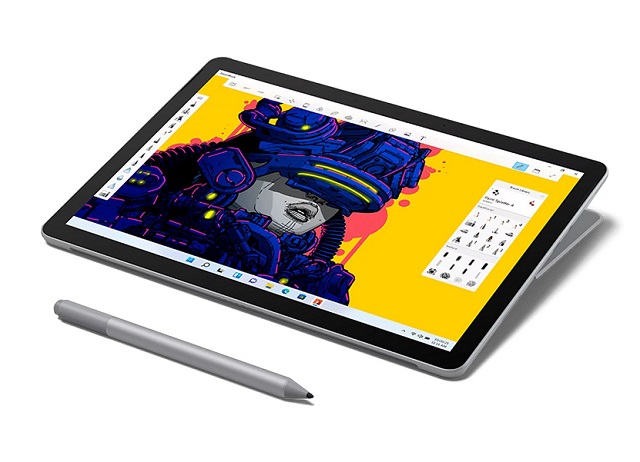
The Surface Go 3 is great for Any kid who wants a compact, budget, well-built windows 2-in-1 tablet for homework, play and drawing.
The platinum-colored magnesium chassis looks nice, feels great. the back of the tablet has an incredibly sturdy kickstand, too. It offers the portability and versatility of a tablet with laptop-like performance.
The 10.5-inch display has a resolution of 1,920 by 1,280 pixels and 100% sRGB color gamur, which delivers impressive detail and good colour accuracy, making it a great option for content consumption.
The Surface Go 3 runs a 10th Gen Intel Core i3-10100Y processor and 8GB of RAM, which delivers reasonably good performance for most day-to-day tasks, but not as fast as other laptops and tablets under $700.
The Surface Pen has 4,096 pressure levels and tilt sensitivity, Lines drawn with the Pen can shift from thin to thick with ease. Drawing on-screen felt natural, with unerring accuracy.
The Surface Go 3 runs on windows 11 operating system and offers a variety of Windows-only drawing apps: photoshop, illustrator, paint tool SAI, Mypaint, Artrage, Corel Painter, paint.Net and etc.
However, 5 hours of Battery life falls short of full-day use, even less when using productivity apps. Plus, Type Cover and Surface Pen are sold separately.
4. Amazon Fire HD 10 Plus
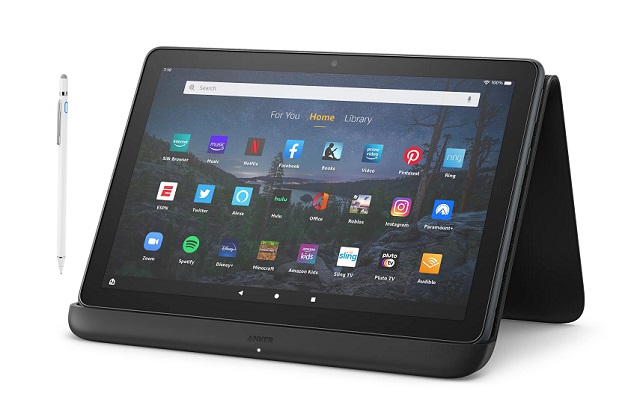
Amazon Fire HD 10 Plus combine a capable tablet, and a curated content library for a one-stop, ready-made entertainment solution that’s ideal for kids ages 3–10.
It comes with durable design that has a soft, silicone bumper that helps protect it from drops and bumps.
The 10-inch screen with 1,920 x 1,200 Full HD+ resolution is perfect for displaying picture books and comics.
The parental controls help you keep your kids safe as they read, watch, and browse.
A 2.0 GHz octa-core MediaTek Helio P60T processor and 4GB of RAM power this budget tablet experience. which is capable enough for casual usage and drawing.
Your kid can use any passive or capacitive stylus that is compatible with the Fire operating system.
The tablet do not supports pressure sensitivity, But you can use a drawing app like Artflow and Medibang paint that will provide the pressure sensitivity you need to use a pen on a Fire Tablet.
With the help of these apps, your kid can take notes, draw and sketch on your Fire tablet.
5. One by Wacom
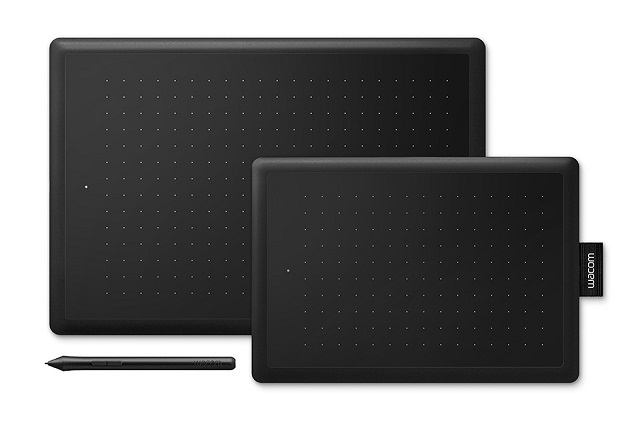
A great and budget drawing tablet for older kids, this one by Wacom tablet has great reviews from parents, kids, and teachers.
It has a drawing area of 6.0 x 3.7 inches (small version) or 8.3 x 5.7 inches (medium), both are slim and not so large and can fit on any computer desk.
The small version is rather compact, thus you can easily take it with you while traveling. while the Medium version is a little much for tiny tots, but for the early teenager with a flare for the arts, it’s just right!
It comes with a stylus with 2,048 levels of pressure sensitivity, which is quite smooth and powerful. the tracking is very good with no noticeable delay and is perfect for art or osu gaming needs.
Even better, the stylus is battery-free and features a side button to quickly switch between pen and eraser functions.
Kids can connect the tablet to Android, Chromebook, Windows, and Mac OS devices using the included USB cable and draw with their favorite apps.
6. XP-Pen Deco Fun
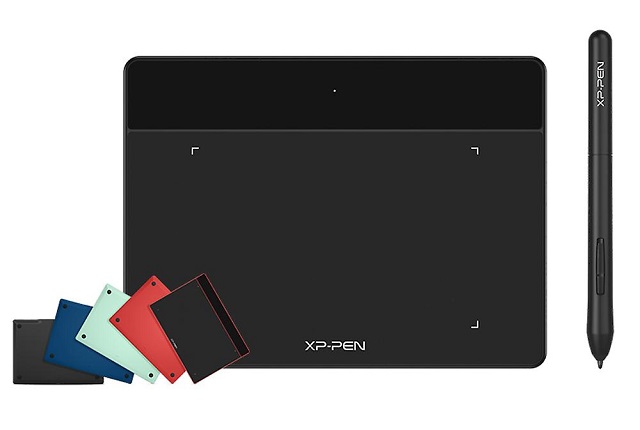
XP-Pen Deco Fun is a great looking tablet, with great drawing performance. ideal for older kids with a flair for drawing.
The Design and build quality are Really solid! It comes in four colors: Green, Red, Blue, and Black.
Deco Fun Series includes 3 tablet sizes: XS (4.8 × 3 inches active area), S (6.3 × 4 inches), and L (10 × 6.27 inches ). Both XS version and S version are small and lightweight, no need to worry to carry over any place.
The L version is big enough to let kids draw from the shoulder without over-taxing their arm, it feels fantastic to work on.
The best part is that it comes with a battery-free stylus which capable of more than 8,000 levels of pressure and tilt response. the pressure and responsiveness are so good, strokes look and feel more natural.
This tablet is compatible with Windows, Mac, Linux, Chromebook and Android devices. To use it with an Android device, you just need to connect it with an OTG connector, but you will have to purchase separately.
Deco Fun is a good tablet for the price it offers. As long as the lack of hot keys won’t bother you, your kids can do well with it.
7. Huion Inspiroy H640p
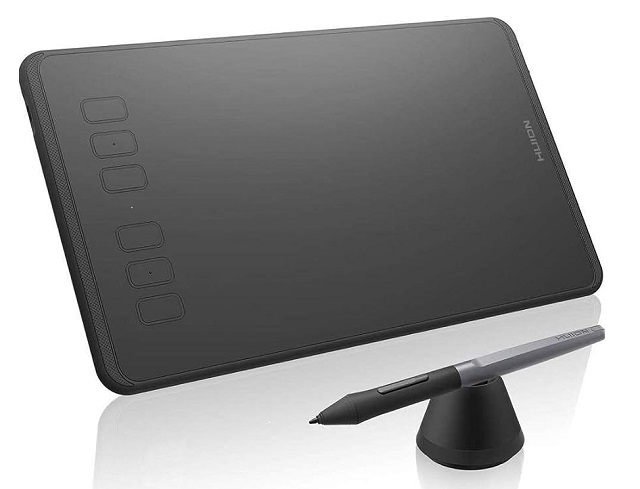
Huion Inspiroy H640p combines several valuable features as affordable price and is designed to serve your kids for many years.
At just 6 x 4 inches of active area, the Huion H640P is perfect for kid’s small hands and is portable enough to fit into a backpack or school bag.
H640P tablet has a battery-free stylus with 8192 levels of pressure sensitivity for a natural and responsive drawing experience, however no tilt functionality.
6 hotkeys on the tablet and 2 pen buttons are individually customizable, giving your child the opportunity to make their drawing life easier in countless ways.
It’s not only compatible with Mac OS and Windows pc, but also can work with ChromeOS and Android too, which means your kid can connect it to a cheaper Chromebook or a android phone.
8. XP-Pen Artist 12 (2nd Gen)
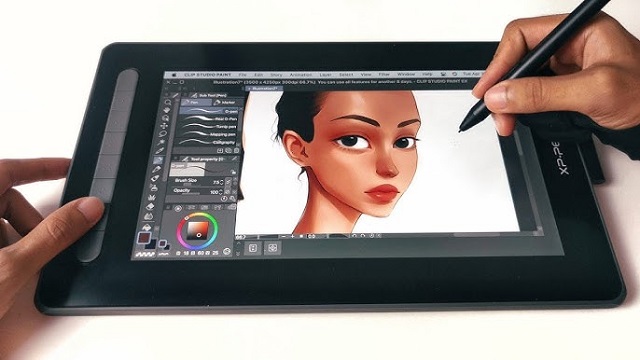
Parents thinking about shelling out for a screen drawing tablet for their young ones would be hard-pressed to find a more economic deal than the XP-Pen Artist 12 (2nd Gen).
The Artist 12 (2nd Gen) tablet is durably-built, with a sturdy housing and a compact, portable design. It’s available in 4 colors: pink, blue, green, and black.
It has a nice 11.9-inch IPS display with FHD 1080p resolution with a wide color gamut of 127% sRGB. This produces sharp, bright, vibrant images, making your kid have the best quality of viewing experiences.
The screen is fully laminated to reduce the parallax, and has a nice matte finish that reduces glare from any surrounding light sources. The surface also has a bit of resistance so the pen does not slide around too much.
It features a battery-free stylus, which is powered by the X3-Smart-Chip without the spring mechanism, the stylus performs better than any other existing XP-Pen stylus.
With its 8192 pressure sensitivity levels, 3g low initial activation force and a 60-degree tilt function, your kid will have easy, intuitive control while creating artwork.
The Artist 12 (2nd Gen) is also developed with 8 hotkeys and 2 pen buttons to adjust necessary functions.
This XP-Pen Artist display tablet also works with different systems, including Windows, Mac, linux, Chromebook and Android devices. It will definitely help older children get creative and master their drawing skills.
9. Wacom One
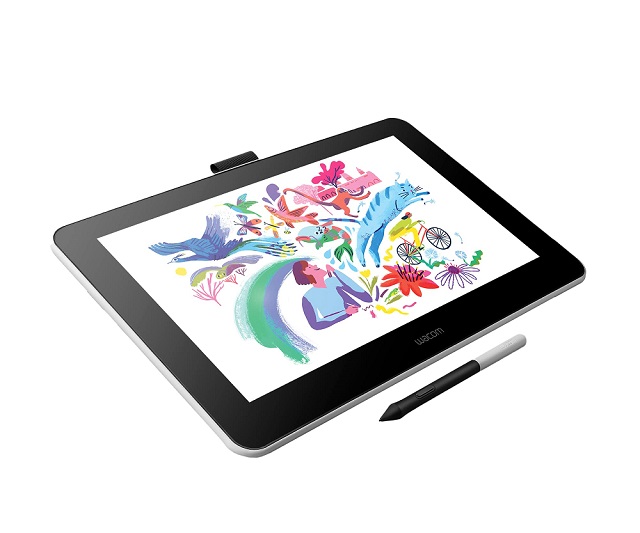
Wacom one is their entry-level pen display tablet featuring a 13.3″ screen, a battery-free pen, bundled bonus software, ideal for teenagers, students and newbies.
With a Full HD resolution of 1920 x 1080 and 99% sRGB color gamut, you get a nice display. It also has a matte protective screen above the screen that the feel of a pen and paper and reduces glare.
Its stylus is lightweight and has a pressure range of 4096 levels along with the tilt sensitivity of ±60°. every line felt completely in control and accurate.
The display is compatible with Windows, Mac, chromebook and Android. The benefits of this added compatibility are fairly significant, especially for kids, students and users on the go.
Even though wacom one is ompact, it is an ideal purchase for anyone considering digital art. It wants a tablet screen they can take anywhere or get into digital art and a device they can use directly to draw on.
10. Huion Kamvas 13
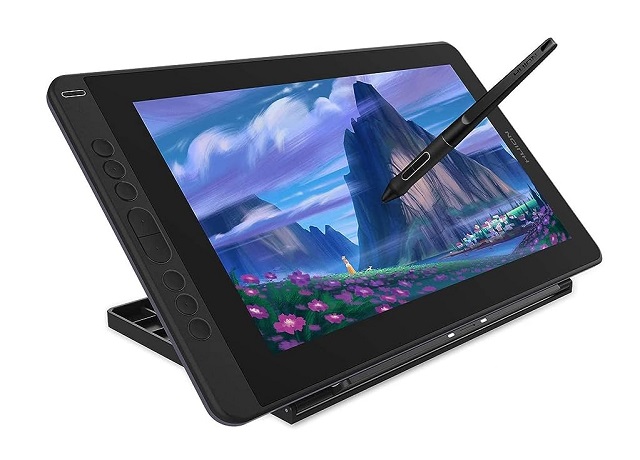
The Huion Kamvas 13 is widely considered to be among the best due to its 13.3-inch workspace making it both portable and affordable.
1920 x 1080 pixel resolution provides clear visuals, and hence even small details can be seen. The color gamut is 120% sRGB, and hence the display looks impressive and realistic.
The Screen features fully laminated technology with a matte screen protector applied, which nearly eliminates issues with parallax and glare.
The battery-free pen with 8192 pressure levels and tilt recognition will help kids in drawing impressive pictures. Precise drawings can be obtained as the thickness of the lines can be altered according to kids’ preferences.
Another important feature that enhances the drawing experience is the 8 customizable shortcut keys that allow kids to navigate easily.
Kamvas 13 tablet is compatible with Windows, Mac and Android devices. It pairs perfectly with PhotoShop, Illustrator, Krita, sketchbook, Medibang Paint, Clip Studio Paint, and other digital art programs.
Conclusion
If your kids have an interest in digital art or creative activities, getting a drawing tablet will help with that.
With which, they can draw, sketch, write, animate, and create projects that can express their creativity.
There should be at least one drawing tablet on our list that’s perfect for your child’s abilities and age group.
We hope you find our reviews helpful! Your choice would depends on your child’s age, needs, preference and your budget.
Furthermore, We suggests limiting recreational screen time to 1-2 hours per day for children aged 2-5 and setting consistent limits for older children based on their individual circumstances.